ONE SHEET / THREE BOOKMARKS
Custom coloring sheets that become bookmarks.
Keep the full drawing inside the top of a narrow bookmark, leave the lower section blank for your own words, and print the template on its matching paper size. The two downloads below each contain three different winter pictures with visible cut guides. Choose A4 or Letter before printing; their bookmark dimensions are deliberately different.
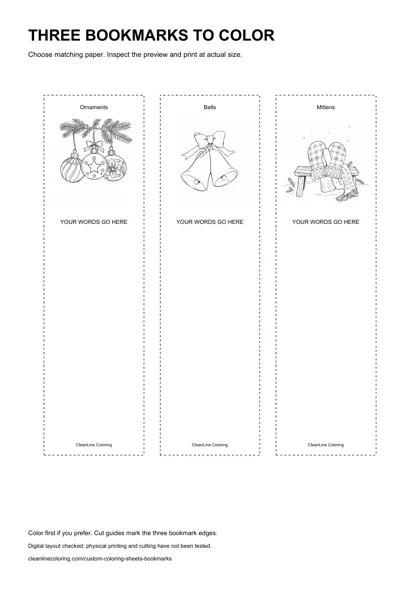
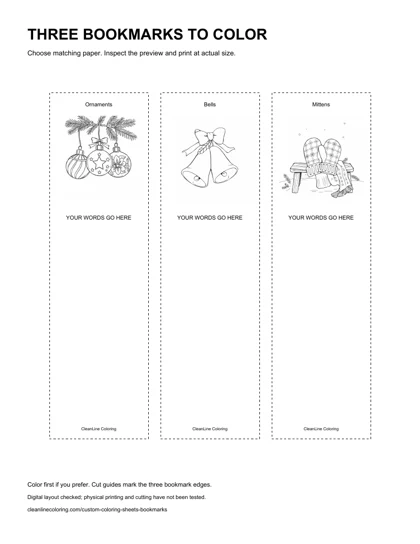
Choose the right template before you print
The A4 file uses a 210 × 297 mm page with three bookmarks measuring 50 × 180 mm each. The Letter file uses an 8.5 × 11 inch page with three bookmarks measuring 2 × 7 inches each. Both place the complete square illustration near the top, leaving a clear writing area below. These are ready-made PDFs, not a new export mode in the generator.
Use the PDF for the dimensions described here. The smaller WebP preview is only for browsing; saving that thumbnail and stretching it to paper size does not reproduce the measured template. Each file is a single page. If you only want one bookmark, you can print the sheet and keep the other two for another session, rather than cropping the PDF and losing its scale reference.
Keep the picture whole in a narrow shape
A tall rectangle and a square drawing have different proportions. Filling the entire bookmark with the square would require stretching it or cropping part of the picture. This layout does neither: it contains the unchanged illustration in a square box inside the bookmark, then uses the remaining space for a message. The ornament trio, bells and mittens are separate reviewed drawings, not one picture copied three times.
The picture box is 44 mm wide in the A4 version and 1.76 inches wide in the Letter version. That leaves a small side inset between the artwork and the dotted cut guide. The original artwork is 1024 × 1024 pixels; it is embedded at its original pixel dimensions. PDF placement changes its display size without inventing additional image detail. Digital geometry and rendering were checked; physical printing has not been tested.
Make three different reading markers
One for a book, one for a notebook, one to share
Give each picture a different purpose. Keep the bells for a current book, use the mittens in a notebook and save the ornament bookmark as a small personal gift. Color the largest shapes first. Small leaves, knitted lines and ornament patterns can stay white when you do not want to work in tiny spaces. You do not need a fixed palette or a correct set of seasonal colors.
Use the blank space instead of covering the drawing
Handwrite a short greeting, an invented reading motto or a private note in the lower panel after printing. Check the length on scrap paper first so the words do not run into the cut guide. The PDF does not have a live name field and does not use an image model to spell a name. For a separate typed-lettering workflow, see our custom name coloring page guide.
Keep a shared motif while changing the details
A small group can choose one accent color and use it somewhere on all three bookmarks. Everything else can differ: one person can add broad stripes below the picture, another can write a message, and another can leave the panel blank. This is a suggested creative activity, not a tested lesson or a claim about reading, focus or motor development. Offer other pictures or a plain paper strip when the winter theme is not wanted.
Print at the intended size, then check the guides
- Download the PDF whose page size matches your loaded A4 or Letter paper.
- Open the print dialog and choose actual size or 100% if available. Disable multiple-pages-per-sheet settings for this single-page template.
- Inspect the preview. All three dotted rectangles should be visible, with a margin outside them. If your printer requires fit-to-page to avoid clipping, the resulting bookmarks will be smaller than the listed dimensions.
- Print one proof, check its physical dimensions with a ruler, and color before cutting if that is easier for your activity.
- Cut only when you are ready to use the bookmark. An adult should handle or supervise scissors as appropriate; the artwork does not provide a cutting-safety certification.
Our digital checks cannot establish how your printer scales, feeds stock or handles ink. Check its instructions before choosing heavier paper, markers or duplex settings. This template is single-sided; a matching back, lamination and ribbon holes are not included. Do not assume that selecting double-sided printing creates a registered reverse side. If you add a hole in a separate craft, decide its position after checking the finished design rather than punching through the picture.
If you use Acrobat, Adobe's guide to PDF page size and scaling explains actual-size and fit options. Other viewers and printer drivers can use different names or controls.
What to change if a bookmark is hard to color
Start with the broad bell or mitten shapes and keep small details unfilled. If a reduced picture feels cramped, use the full-size illustration in the linked Christmas collection instead of forcing the whole scene into a small strip. You can also use a wide pencil for the blank lower area and a narrower pencil near the picture. Tool choice is a personal preference, not a guarantee of a particular result.
If you want to design a different bookmark from a generated picture, save the full output first, then place it with its proportions preserved in your own document. Leave a separate writing panel and margin. These downloads demonstrate one measured layout; they do not automatically import your uploaded photo, custom prompt or finished coloring into a bookmark. The generator below still makes its usual individual coloring-page outputs.
FAQ
Are these custom coloring sheets free?
Yes. Both prepared bookmark PDFs can be downloaded without an account or purchase. Use them for personal or classroom activities; this does not grant resale or commercial repackaging rights.
Which PDF should I use for Letter paper?
Use the Letter PDF. It has an 8.5 × 11 inch page and three 2 × 7 inch bookmarks. Using the A4 file with a fit setting changes the physical dimensions.
Can I type a name into this PDF?
No. These files are not fillable forms. The lower panel is blank for handwriting, or you can use a compatible editor on your own copy. The separate name-page guide describes a typed-lettering workflow.
Does the bookmark crop the illustration?
No. Each full square drawing is contained in a square picture box. The rest of the bookmark is a blank panel, so the drawing is neither stretched nor cropped to fill the tall rectangle.
Has the template been printed on paper?
No. We checked the digital page dimensions, image placement and rendered PDF. We have not tested physical printing, paper durability, printer margins or cutting the sheets.