Custom coloring sheets: why a PDF can hide the edges
If the original picture is complete but a downloaded PDF hides its edges, check the PDF's page boundary before generating another image. A CropBox can make a smaller part of a page visible without deleting the drawing stored inside it. Our three downloadable diagnostic PDFs keep exactly the same drawing commands: a full A4 page, a deliberately cropped view, and a copy with its full boundary restored. This page demonstrates that specific cause; it does not repair arbitrary uploads.
Compare the actual PDF boundaries
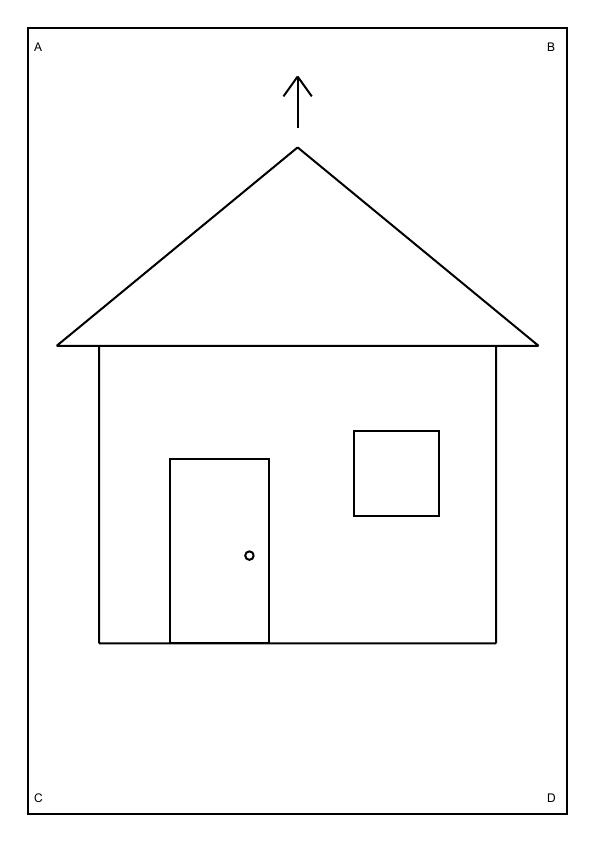
Previews are real Poppler renders at 72 dpi, using each PDF CropBox. Download the PDFs to compare in your own viewer.
A page boundary is different from an image crop
A PDF describes both page content and page geometry. The MediaBox describes the underlying page rectangle. The CropBox identifies the region normally displayed or printed. In this controlled example the MediaBox stays A4 while the CropBox changes. A viewer can therefore show a smaller page even though the same roof, windows and corner markers remain in its content stream.
This is a different question from fitting an image onto paper. Scaling changes how large a picture is placed. A PDF page box changes the visible page region. It is also different from trimming white image margins, which produces a different image rectangle. First decide whether your missing edge is already absent from the PNG, absent only in a PDF viewer, or absent only on paper.
What the three files prove
The full file measures 210 by 297 millimeters. Its visible box covers that complete rectangle. The cropped file retains the same A4 MediaBox but moves each visible edge inward by 40 millimeters, leaving a 130 by 217 millimeter CropBox. The third file restores the full A4 CropBox from the cropped copy. None of these operations moves, redraws or rescales the house diagnostic.
The build compares decoded PDF content streams byte for byte. They are identical across all three files. It then renders each PDF with Poppler using its CropBox, rather than hiding a picture with CSS. The full and restored renders are pixel-identical; the smaller render loses the outside markers and parts of the roof. These are checks on our supplied files and renderer, not measurements of every PDF application.
Check the saved file before changing your artwork
- Keep the original download. Work on a copy so a page-boundary experiment does not replace the only version you have.
- Compare the source picture. Open the actual PNG or JPEG. If the outline is already cut there, restoring a PDF boundary cannot invent the missing drawing.
- Inspect page properties. In a PDF editor that exposes page boxes, compare MediaBox and CropBox. A smaller CropBox is a clue, rather than proof that every missing edge has the same cause.
- Preview a separate corrected copy. Restore a boundary only when you understand what lies outside it. That area may contain notes or marks you intentionally excluded.
- Choose printing settings afterward. Check paper size and scaling in print preview. A complete PDF can still be clipped by a printer's nonprintable margins.
Use the diagnostic without uploading a photo
The house is an original functional test pattern with an asymmetric door and four outside locator marks. It is intentionally simple so a missing side is easy to recognize. Switch between the rendered previews, then download the corresponding PDF and open it in your own viewer. Compare the full and restored versions at the same zoom. Compare page dimensions as well as the visible drawing.
Our previews show a known renderer's output; they do not interrogate the PDF engine built into your browser. The download buttons deliver the actual PDFs, not flattened screenshot substitutes. Nothing on this demonstration changes your own PDF. For new artwork, start with the AI coloring page generator, inspect the complete downloaded outline, then package it for the intended paper size.
Limits and next checks
A smaller visible box does not always mean a mistake. Cropping can be intentional, and restoring it can reveal material that should remain hidden. A CropBox is a viewing boundary rather than a secure deletion method. If confidential content must be removed, use an appropriate redaction workflow and verify its output separately. These diagnostic files contain no personal information.
Physical printing and third-party PDF editors were not tested. The experiment uses one page, zero page rotation and no bleed or trim workflow. For the geometry API used to construct the samples, see the pypdf cropping documentation. For a sideways source image, use the separate photo-orientation diagnostic; page boxes do not fix its stored direction.
FAQ
Does the cropped sample delete its drawing?
No. Its decoded content stream matches the full sample. The smaller CropBox hides the outer region when rendered with that box.
Can a larger CropBox recover a clipped PNG?
No. If pixels were removed before the image entered the PDF, changing the page boundary cannot reconstruct them.
Are the full and restored samples the same?
They have equal page boxes, identical decoded drawing commands and pixel-identical Poppler renders. Their PDF file bytes can differ.
Why do the preview dimensions change?
The renders use the visible CropBox at the same resolution. A 130 by 217 millimeter region has fewer pixels than the full A4 rectangle.
Will restoring A4 guarantee a complete print?
No. Paper selection, scaling and the printer's printable area still matter. No physical printer was tested for these samples.