PRINTING YOUR OWN COLORING BOOK / PAGE ORDER
Keep the backs of your coloring pages blank.
For one picture per sheet, the simplest starting point is the pictures-only PDF with single-sided printing selected. If you deliberately prepare a two-sided document with empty reverse pages, use the blank-backs example and inspect its order: picture, blank, picture, blank. Neither file controls your printer's settings.
Picking one sheet from a PDF pack? Compare physical page positions and PDF page labels before choosing a print range.
Download a three-picture robot set
Pictures only
3 PDF pages · A4 · 5,948,844 bytes
Download 3-page PDFBlank backs
6 PDF pages · A4 · 5,950,048 bytes
Download 6-page PDF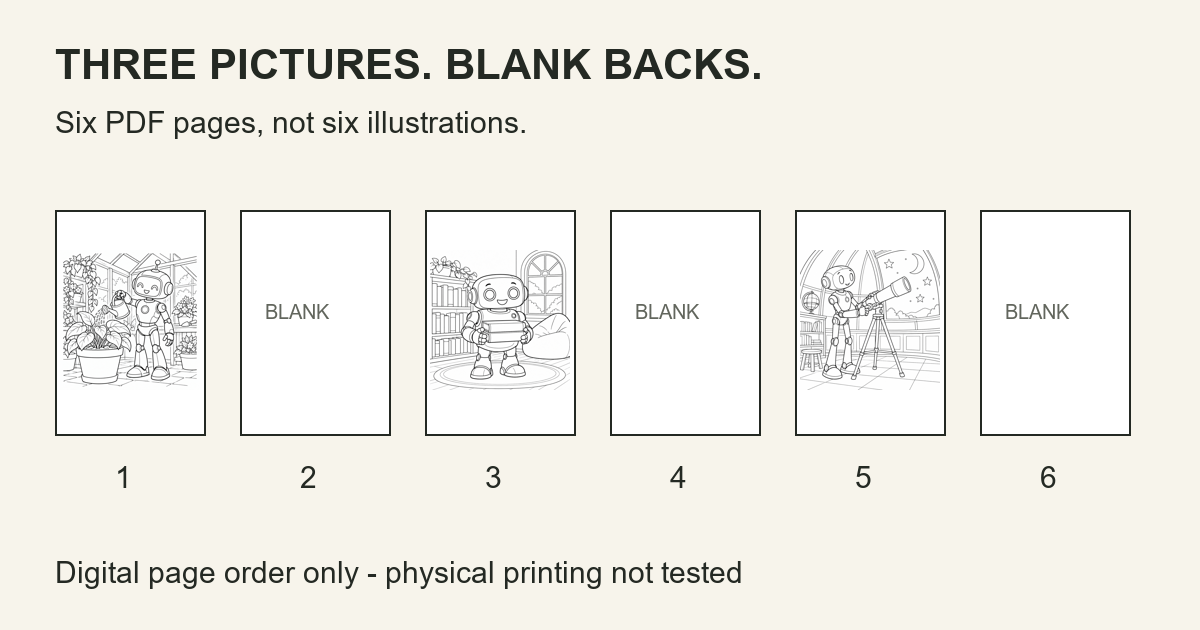
Two files, the same three pictures
Both downloads contain the same three unchanged reviewed robot illustrations: greenhouse watering, library books and observatory telescope. The pictures-only file has three PDF pages. The blank-backs file has six: pictures on pages 1, 3 and 5, with empty pages 2, 4 and 6. The added pages are intentionally empty. They are not missing illustrations, extra activities or newly generated art.
These are prepared A4 examples for a small personal or classroom assembly project. There is no cover, binding, cutting guide or publication-ready manuscript. The robot designs differ across the scenes; they are not claimed to be one character generated consistently. The separate coloring book sequence planner lets you plan an order, while this page demonstrates what happens when a blank page follows each picture.
Choose the file for the way you intend to print
Pictures only: a short single-sided stack
Choose the three-page file when you want one picture on each sheet and can select single-sided printing. A blank reverse is then a consequence of printing on one side of the paper, not an extra PDF page that needs downloading. Inspect all three pages in the viewer before making copies. If you turn on two-sided printing for this compact file, two consecutive pictures may be placed on opposite sides of the same sheet.
Blank backs: an explicit digital sequence
The six-page example makes the empty reverse positions visible inside the document. In an ordinary sequential duplex job, a picture followed by a blank is intended to form one front-and-back pair. That is an intended layout, not a tested hardware result. Check your driver's behavior, especially any setting that removes blank pages. Do not assume that every application preserves the sequence exactly as shown in a PDF viewer.
Printing every page of the six-page example in single-sided mode can produce separate empty sheets between the drawings. That is usually unnecessary when all you needed was a blank reverse. Keep the compact example available so you can choose the simpler workflow instead of guessing why extra sheets appeared.
Read the page map before printing
| PDF page | Content |
|---|---|
| 1 | Greenhouse robot |
| 2 | Blank |
| 3 | Library robot |
| 4 | Blank |
| 5 | Observatory robot |
| 6 | Blank |
The map uses PDF page numbers, starting at one. It is not a manual instruction for reinserting paper. The source art is centered in a square box on portrait A4 pages. Each square preserves its proportions and leaves white margins. The exact digital page dimensions and image box are recorded with the downloadable files; printer drivers may scale or reposition them.
If you later insert a cover or an introduction at the beginning, review the entire sequence again. Adding a single page changes which page numbers are odd and even. Do not copy the numbers from this example into a longer document without checking where the pictures actually land. A page order that was correct before the insertion may no longer serve the same purpose.
A short inspection routine
- Open the PDF you downloaded. Confirm whether its page counter says three or six. Both versions use the same robot pictures, so the first thumbnail alone cannot identify the file.
- Inspect each page thumbnail. In the six-page example the blank positions are after the pictures. In the three-page version there are no intentionally empty pages.
- Choose paper and sidedness separately. A4 is the PDF size. The printer's single-sided or double-sided option is another setting, controlled by your application and driver.
- Look for unexpected reordering. Booklet, reverse-order, multiple-pages-per-sheet or blank-page removal options can change the job you are preparing. Use an ordinary full-page layout for this example.
- Try one proof before a stack. Check where the drawing ends up and which side is empty, then decide whether that result matches your materials and activity.
Adobe's Reader printing guide explains print options and notes that the printer driver controls two-sided availability. This page does not prescribe a feed direction or flip edge for an untested printer. We have not tested these files on a physical printer, and a blank reverse does not guarantee that marker ink will not pass through paper.
Use the empty reverse deliberately
For a home session, keep the back empty if you want to avoid placing another drawing directly behind the one being colored. At a classroom table, the compact single-sided set can be easier to identify than a document with blank thumbnails. For a story activity, use the three robot scenes as different tasks, then write a separate explanation on another sheet. None of these suggestions is a tested learning outcome or an age rating.
Keep an unchanged master of the prepared files. If you build a longer collection, maintain a page map as you add or remove pictures. Blank PDF pages are a layout choice, not additional printable content. Our permission for these site-created drawings covers personal and classroom activities; it does not grant resale or repackaging rights. This example is not a KDP compliance export or a bound coloring book.
Questions about blank backs
Why does one download have six pages but only three drawings?
It deliberately inserts one empty page after each of the three drawings. Those empty pages are reverse-side positions, not additional illustrations.
Which version should I use for single-sided printing?
Start with the three-page pictures-only file and select single-sided printing. Printing all six pages single-sided can create separate blank sheets.
Does the PDF force my printer to leave the reverse empty?
No. Your print application and driver control the physical job. Inspect the sequence and settings, including any option that removes blank pages.
Is this a bound book or a KDP-ready manuscript?
No. These are two small prepared A4 comparison files without a cover, binding or a publishing-compliance guarantee.
Will a blank reverse prevent marker bleed-through?
No such result is guaranteed. Paper, ink and materials vary, and physical printing and marker tests have not been performed.