Custom coloring sheets: why a PDF opens sideways
If a coloring-sheet PNG looks upright but its PDF opens sideways, check the PDF's saved page rotation before redrawing or stretching the picture. These three downloadable PDFs contain the same original drawing commands: one upright page, one with a saved 90-degree turn, and one restored to the original orientation.
This is a PDF-page check, separate from a phone photo's EXIF orientation. The examples below change the page view rather than the artwork. They are diagnostic drawings, not new AI gallery illustrations.
Compare the saved page orientations
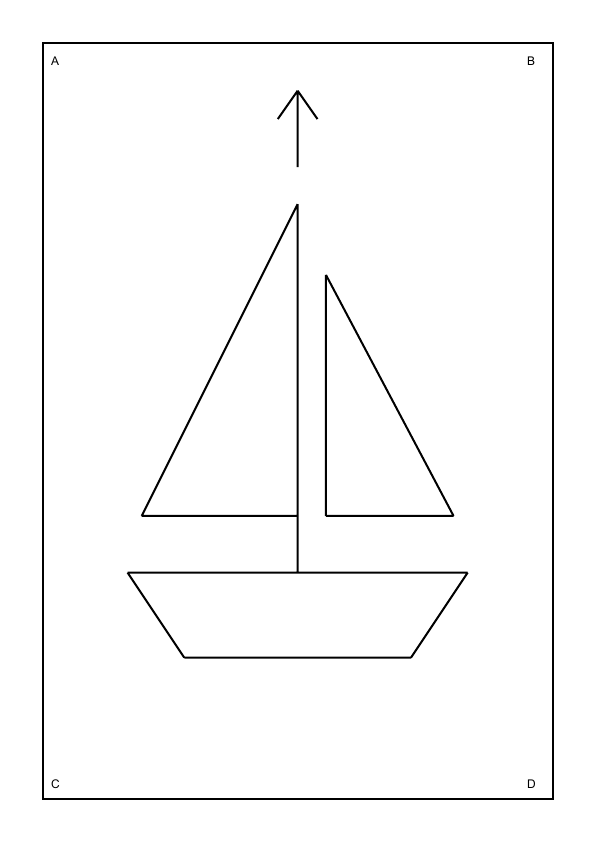
What changed in the three files?
We drew a simple sailboat with a direction arrow and four corner letters on an A4 page. We then saved a second copy with a 90-degree clockwise page rotation and a third with that rotation returned to zero. All three retain the same 210 × 297 mm page box and byte-identical decoded drawing streams.
The saved turn changes the displayed orientation. At 72 dpi, our upright and restored previews are 596 × 842 pixels; the turned preview is 842 × 596 pixels. The upright and restored renders also have identical pixel data. These measurements describe these files and this renderer, rather than every PDF viewer or printer.
| Sample | Saved rotation | Rendered preview |
|---|---|---|
| Upright | 0° | 596 × 842 |
| Sideways | 90° clockwise | 842 × 596 |
| Restored | 0° | 596 × 842 |
How can I tell a sideways page from a cropped picture?
Start with the corner letters and arrow in the samples. A quarter-turn keeps the whole drawing and all four letters visible while changing which edge appears at the top. A cropped view can hide edge marks instead. If a subject is missing rather than sideways, compare our separate PDF page-box experiment.
Look at the downloaded file after closing and reopening it. A viewer's temporary Rotate View control can make a page convenient to read without saving the change. That temporary view is not evidence that the exported file has been corrected. Menu names differ, so check your editor's save or export behavior rather than relying on the button's icon.
A short check before printing a coloring sheet
- Keep the original. Save a separate working copy so that a rotation or export mistake remains reversible.
- Open the PDF itself. Compare its arrow and corner positions with its PNG source. A thumbnail in a messaging app may not show the same saved file.
- Check the saved orientation. Apply a page rotation in a PDF editor when the entire page is sideways, then save and reopen the working copy.
- Review print preview separately. Automatic paper orientation and fit settings may change placement. Inspect them after fixing the file, rather than stretching the drawing to make it fit.
For a page that is upright but too small, use the fit-to-paper guide. Rotating a page does not increase the detail in an embedded raster image. Our print-resolution comparison addresses that different question.
What did we actually verify?
The three PDFs were reopened to read their saved rotation and page boxes. Their decoded drawing streams were compared byte for byte, then rendered with Poppler at 72 dpi. The previews on this page are those renders. You can download the same files and compare their behavior in your own viewer.
This page demonstrates saved rotation; it does not upload or repair a visitor's PDF. Physical printing, mobile PDF editors and third-party save dialogs have not been tested. The printable snowman collection provides finished coloring choices when you want artwork rather than diagnostic files.
PDF rotation questions
Does the sideways sample contain different artwork?
No. Its decoded drawing stream is byte-identical to the upright sample. Only the saved page rotation differs in this controlled comparison.
Does Rotate View permanently fix my PDF?
That depends on the viewer and command. Close and reopen the saved copy to check; a temporary viewing adjustment may leave the file unchanged.
Should I rotate my original photo instead?
Only if the source image itself is sideways. These samples isolate a PDF-page setting while retaining the drawing commands, so rotating the source as well could add an unnecessary second turn.
Are these real print tests?
No. The evidence covers PDF structure, rendered pixels and browser downloads. Physical printing and external-editor behavior remain untested.
Technical reference: pypdf's page-rotation documentation. The downloadable fixture measurements come from our own scripts, not from competitor claims.